Custom FiveM Emotes: Turn Any Video Into an In-Game Animation
Make custom FiveM emotes from a phone video: record the motion, convert it to a YCD animation, stream it from a resource and play it with a command or rpemotes.
· 6 min read
Emotes are one of the cheapest ways to make a FiveM server feel alive. A server-exclusive dance, a signature gang greeting or a job-specific animation for your mechanics gives players something to show off, and clips of them spread on TikTok and Discord.
The traditional way to make one is slow: motion-capture gear or hours of keyframing in Blender, then rigging to the GTA skeleton and exporting with community tools. This guide covers the faster way. Record yourself on your phone, convert the video into a GTA animation file and stream it from your server.
Short version: record a clean 1–30 second video, turn it into a
.ycdfile, drop it into a resource'sstream/folder, then play it withTaskPlayAnimor add it to your emote menu.
How animations work in FiveM
GTA V stores animations in clip dictionaries: .ycd files. Each dictionary contains one or more clips, which are the actual animations.
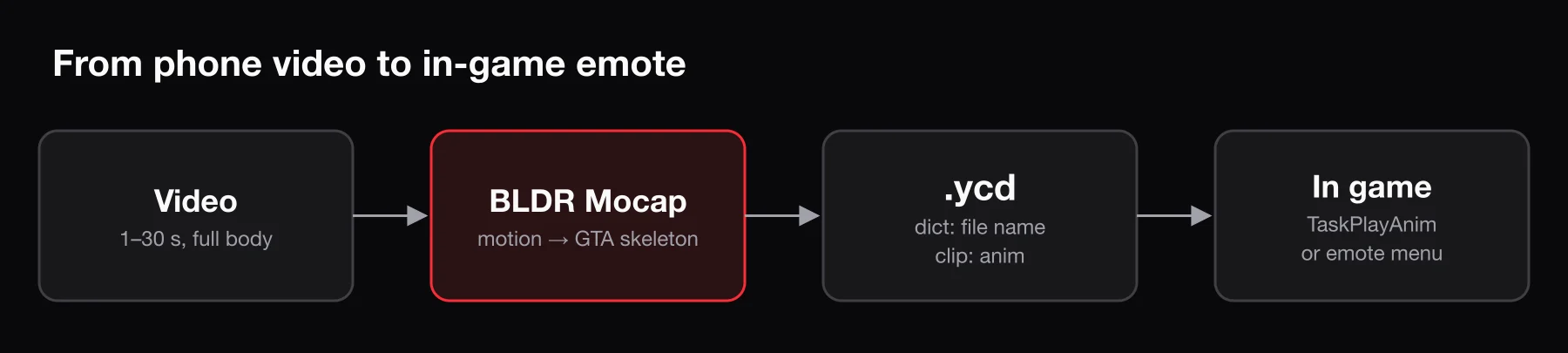
To play an animation, a script needs two names:
- the dictionary – the
.ycdfile name without the extension, for examplemy_dance; - the clip – the animation's name inside that file, for example
anim.
FiveM lets you stream your own .ycd files just like custom cars or clothing. Any .ycd inside a resource's stream/ folder is sent to players when they join, and from then on it works exactly like a built-in GTA animation.
Step 1: Record a good video
The quality of the animation depends almost entirely on the input video. A few rules make the difference between a clean emote and a jittery one:
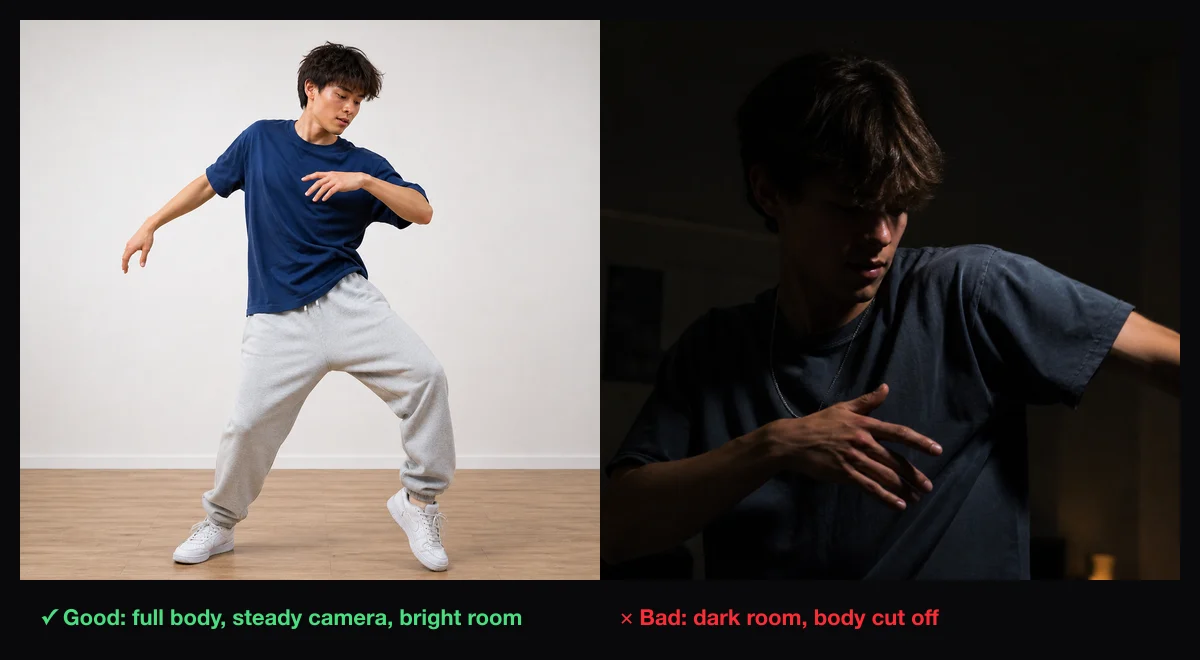
- Film the whole body, head to feet, for the entire clip. Feet leaving the frame is the most common cause of sliding and jitter.
- Keep the camera still. Use a tripod, or lean the phone against something. No panning or zooming.
- One person in frame. Other people moving in the background confuse the tracking.
- Light the scene well and stand in front of a plain background.
- Wear fitted clothing. Baggy hoodies and long coats hide the joints the tracker needs to see.
- Face the camera at a slight angle, or straight on. Avoid long stretches with your back to it.
- Start and end in the same neutral pose if the emote should loop. That way the loop does not visibly snap.
Keep it short. Most emotes are 2–10 seconds of looping motion. You can always record a longer take and trim it.
Step 2: Convert the video to a YCD animation
With BLDR's video-to-animation tool:
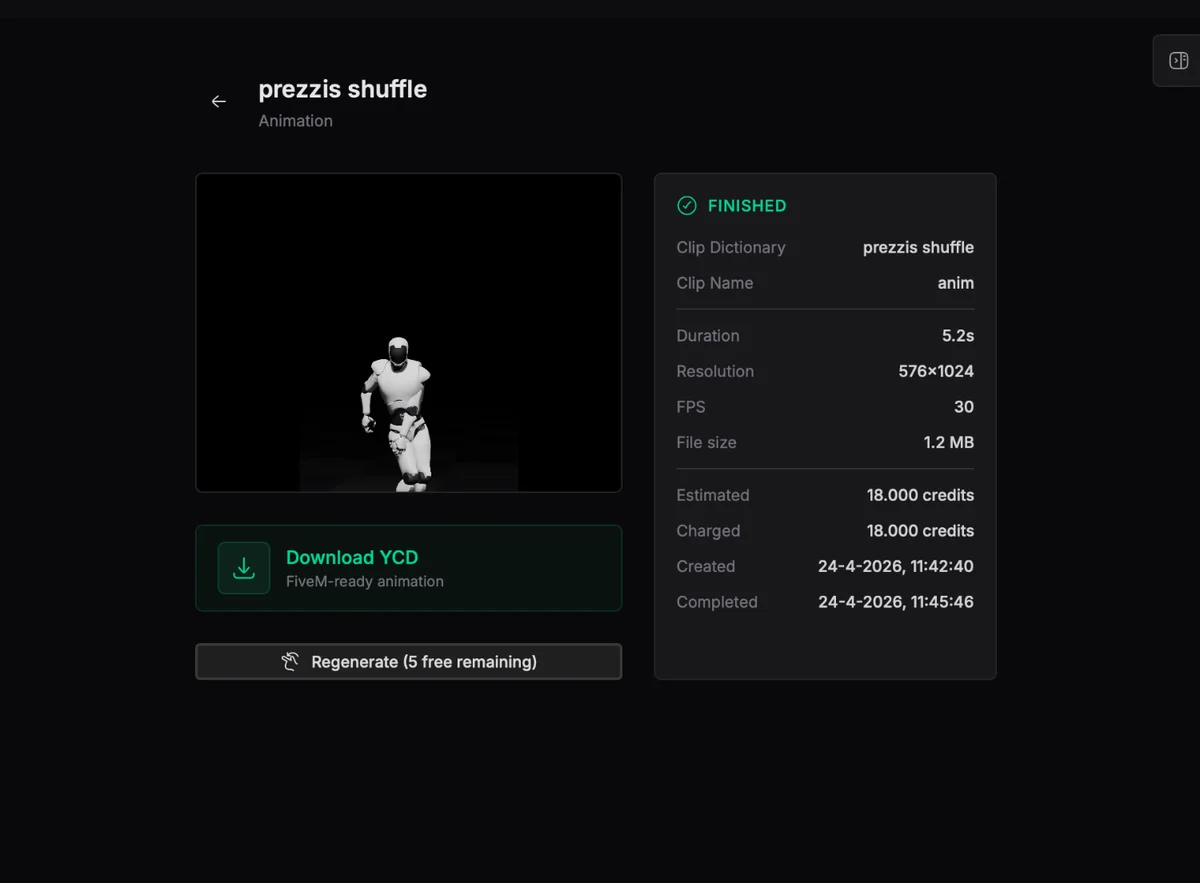
- Open Mocap and choose Video to Animation.
- Upload your clip. Videos must be 1–30 seconds long and under 100 MB.
- Give the project a short name. It becomes the file name of your animation, and therefore the dictionary name, so use lowercase letters, numbers and underscores only:
bldr_wave, notMy Wave (final).mp4. - Wait for processing. BLDR extracts the body motion from the video, retargets it to the GTA V ped skeleton and builds a
.ycd. - Preview the result, then download the
.ycd(downloads are included in paid plans).
The clip inside every BLDR export is named anim, so the dictionary is your file name and the clip is always anim.
Pick a unique name. If your dictionary shares a name with a base-game dictionary or another resource's animation, one of them will silently replace the other. Prefixing everything with your server's name (
myrp_wave,myrp_dance01) avoids that.
Step 3: Create a resource for your emotes
Create a folder in resources/ for your custom animations:
resources/
└── [emotes]/
    └── myrp_anims/
        ├── fxmanifest.lua
        └── stream/
            ├── myrp_wave.ycd
            └── myrp_dance01.ycd
The fxmanifest.lua only needs to declare the resource. Everything in stream/ is streamed automatically:
fx_version 'cerulean'
game 'gta5'
Add it to server.cfg so it starts with the server:
ensure myrp_animsRestart the resource, or the server, and the animations are now available to every connected player.
Step 4: Play the animation
With a simple command
The quickest way to test is a small client script. Add a client.lua to the same resource and register it in the manifest with client_script 'client.lua':
local function playEmote(dict, clip, flags)
    RequestAnimDict(dict)
    while not HasAnimDictLoaded(dict) do
        Wait(0)
    end

    TaskPlayAnim(PlayerPedId(), dict, clip, 8.0, -8.0, -1, flags, 0, false, false, false)
    RemoveAnimDict(dict)
end

RegisterCommand('wave', function()
    playEmote('myrp_wave', 'anim', 49)
end, false)

RegisterCommand('stopemote', function()
    ClearPedTasks(PlayerPedId())
end, false)
Type /wave in game to test. The flags argument controls how the animation plays:
| Flag | Value | Effect |
|---|---|---|
| Loop | 1 | Repeat until cancelled |
| Upper body only | 16 | Legs keep normal movement |
| Player control | 32 | The player can still move while animating |
Add the values together to combine them. 49 (1 + 16 + 32) is the classic "loop on the upper body while walking", good for waves and gestures. Use 1 for full-body dances where the legs should follow the animation.
If you use ox_lib, lib.requestAnimDict(dict) replaces the request-and-wait loop.
In your emote menu
Most servers use an emote menu such as rpemotes-reborn rather than separate commands. These menus come with a file for custom animations, where each entry maps an emote command to a dictionary and clip. In rpemotes-reborn an entry looks roughly like this:
["myrpwave"] = {
    "myrp_wave",   -- dictionary (your .ycd file name)
    "anim",        -- clip name (always "anim" for BLDR exports)
    "MyRP Wave",   -- label shown in the menu
    AnimationOptions = {
        EmoteLoop = true,
        EmoteMoving = true,
    },
},
The exact file name and table structure change between versions, so check your emote menu's README for where custom emotes go. Keep your .ycd files in your own streaming resource rather than inside the menu's folder; that way updating the menu never deletes your animations.
Troubleshooting
The animation does not play at all. Check that the resource is started (ensure myrp_anims), that the dictionary name in your script exactly matches the .ycd file name (without .ycd) and that the clip name is anim. Names are case-sensitive in practice; keep everything lowercase.
The player freezes in a T-pose or default pose. The dictionary did not load. Usually this is a typo in the dictionary name or the file is not inside stream/.
Feet slide or the body drifts. That comes from the source video: the camera moved, or the feet left the frame. Re-record with a fixed camera and the full body visible.
The loop snaps at the end. Start and end the recording in the same pose, or trim the clip so the first and last frames match.
It looks different on female peds. Male and female freemode peds have different proportions, so the same animation can look slightly off on one of them. Test on both, and record a separate take if one looks wrong.
Ideas for server-exclusive emotes
- Trend emotes. Recreate a dance that is trending right now. Players love using the same moves they saw online, and clips of your server doing them are great promotion.
- Job animations. Mechanics wiping hands, paramedics checking a pulse, police signalling traffic.
- Gang and crew signatures. A greeting or pose unique to each organization on your server.
- Staff and event emotes. Celebration animations for event winners or a special emote for supporters.
Need a server to put them on? Start with How to Make a FiveM Server. If you are choosing a framework at the same time, Qbox vs QBCore vs ESX compares the three main options.
Frequently asked questions
Do I need motion-capture equipment?
No. A phone on a tripod is enough for most emotes, as long as the full body stays in frame and the camera does not move.
Do players need to download anything?
No. Animations in a stream/ folder are sent to players automatically when they join, like any other streamed asset.
Can I sell the emotes I make?
Your own recorded performance is yours. Follow the Cfx.re monetization rules if you sell them, and do not recreate copyrighted choreography or likenesses you do not have rights to.
Does this work on RedM?
This guide covers GTA V and FiveM. RedM uses a different skeleton and animation set, so FiveM .ycd files do not carry over.