FiveM Custom Props: From 3D Model to In-Game Object
How to make custom FiveM props: the ydr, ytd and ytyp files, streaming and DLC_ITYP_REQUEST, spawning with CreateObject, ymap placement and common fixes.
· 10 min read
Custom props are the small things that make a FiveM server look like its own place: a branded coffee cup in the café, a drug lab table, a trophy for event winners, a sign with your server's logo. GTA V ships with thousands of props, but sooner or later you need one that does not exist.
This guide covers the whole path from a 3D model to an object players can see, touch and pick up: which files a prop needs, the two ways to make them, how to stream them, and how to spawn, place and use them from scripts.
Short version: a FiveM prop is a
.ydrmodel, a.ytdtexture dictionary and a.ytyparchetype file, optionally with a.ybncollision. Put them in a resource'sstream/folder, declare the.ytypwithdata_file 'DLC_ITYP_REQUEST'infxmanifest.lua, then spawn the prop withRequestModelandCreateObjector place it permanently with a.ymap.
What a FiveM prop is made of
A prop is not one file. GTA V splits an object into a few pieces, each with its own job:
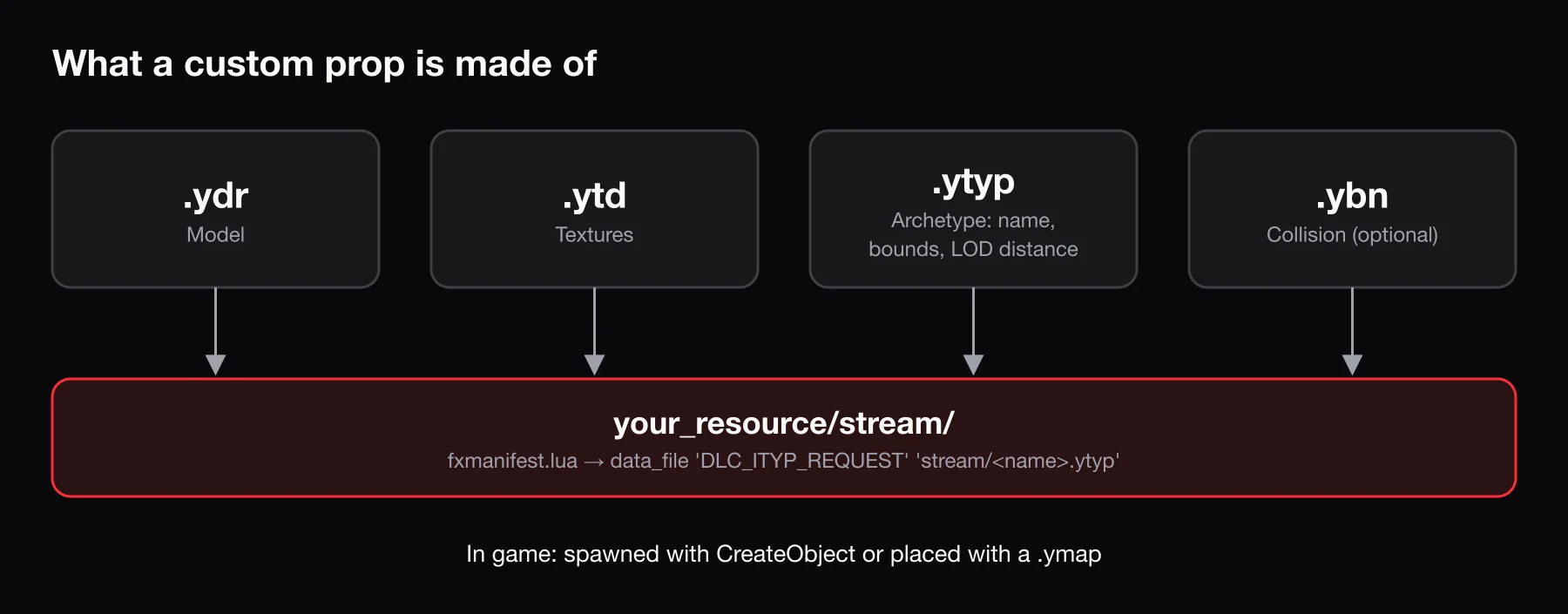
| File | What it holds | Required? |
|---|---|---|
.ydr | The drawable: the mesh, its materials and its levels of detail | Yes |
.ytd | The texture dictionary: the images the model's materials use | Yes, unless textures are embedded in the .ydr |
.ytyp | The archetype definitions: tells the game the model exists and how to treat it | Yes, for custom models |
.ybn | Static collision: what players and vehicles bump into | Optional, but you usually want it |
For a full breakdown of these and the other RAGE formats, see GTA V and FiveM file formats.
Why the .ytyp matters
The .ydr is only geometry. The game does not know an object called myrp_coffee_cup exists until an archetype says so. The archetype in a .ytyp records, among other things:
- the name of the model, which becomes its model hash;
- the texture dictionary it should load textures from;
- its bounding box and bounding sphere, which the engine uses to decide when the object is on screen;
- its LOD distance, the distance at which the object stops being drawn;
- flags that control physics and rendering.
Without a loaded archetype, CreateObject has nothing to create, and map files cannot place the object. That is why a missing or undeclared .ytyp is the most common reason a custom prop "does not work".
Pipeline 1: the traditional way (Blender + Sollumz)
The standard community toolchain is free:
- Blender with the Sollumz add-on. Sollumz imports and exports GTA V formats directly from Blender, including
.ydr,.ybn,.ytypand, in recent versions,.ytdtexture dictionaries. It requires Blender 4.0 or newer; on Blender 4.2+ you install it as an extension fromhttps://repo.sollumz.org/. - CodeWalker for browsing game archives, viewing models in the world and creating
.ymapfiles to place objects on the map. - OpenIV is still widely used to browse and extract files from the game's archives, but you do not need it to build a prop.
The rough workflow:
- Model the object in Blender, or import an existing model. Keep the scale real: one Blender unit is one meter in game.
- Apply Sollumz shaders to the materials and convert the mesh to a drawable.
- Create a collision for it, either simple primitives (boxes, cylinders) or a low-poly mesh.
- Create the archetype in the Sollumz
.ytyptools: set the name, texture dictionary, LOD distance and asset type. - Export the
.ydr,.ytd,.ybnand.ytyp.
This route gives you full control, and it is the way to go for detailed hero props. The cost is time: modeling, UV unwrapping, texturing and learning the Sollumz workflow add up to hours for a single prop, and much more the first time.
Pipeline 2: generate it with BLDR
BLDR's 3D tool skips most of that work:
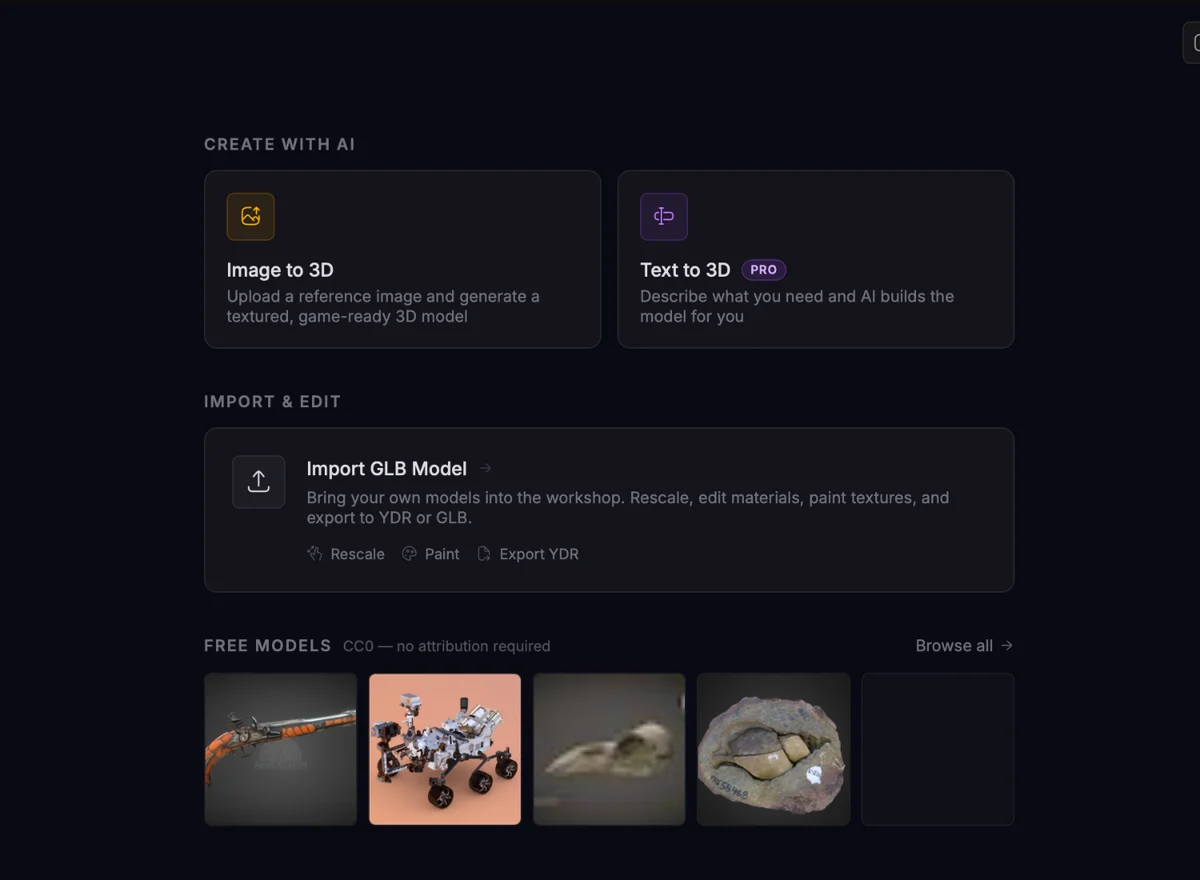
- Open 3D and generate a model from a text prompt or a reference image, or import your own GLB.
- Edit the model and texture-paint it until it looks right.
- Export. The download is a zip that is already a FiveM resource, named after your project:
myrp_coffee_cup/
├── fxmanifest.lua
├── cl_spawn.lua          ← optional test command
└── stream/
    ├── myrp_coffee_cup.ydr
    ├── myrp_coffee_cup.ytd
    └── myrp_coffee_cup.ytyp
The manifest already declares the archetype file, and the optional cl_spawn.lua registers a /spawn_<model> command that drops the prop in front of you for testing. Exports require a paid plan.
Whichever pipeline you use, the result is the same set of files, and everything below applies to both.
Streaming the prop from a resource
Put the files in a resource folder and tell FXServer about the .ytyp:
fx_version 'cerulean'
game 'gta5'

data_file 'DLC_ITYP_REQUEST' 'stream/myrp_coffee_cup.ytyp'
Everything inside stream/ is sent to players automatically. The data_file line is what makes the game actually register the archetypes in the .ytyp; streaming the file alone is not enough.
Then start the resource in server.cfg:
ensure myrp_coffee_cupIf you have many props, put them all in one resource with one .ytyp that holds every archetype, or list several data_file lines. Fewer, well-organized resources are easier to maintain than fifty tiny ones. New to resources in general? How to Make a FiveM Server explains the folder layout.
Spawning a prop from a script
To create a prop at runtime, load its model, create the object, then release the model:
local function spawnProp(modelName, coords)
    local model = joaat(modelName)

    if not IsModelInCdimage(model) then
        print(('Model %s does not exist'):format(modelName))
        return
    end

    RequestModel(model)
    while not HasModelLoaded(model) do
        Wait(0)
    end

    local obj = CreateObject(model, coords.x, coords.y, coords.z, true, true, false)
    PlaceObjectOnGroundProperly(obj)
    FreezeEntityPosition(obj, true)
    SetModelAsNoLongerNeeded(model)

    return obj
end

RegisterCommand('coffeecup', function()
    local coords = GetOffsetFromEntityInWorldCoords(PlayerPedId(), 0.0, 1.5, 0.0)
    spawnProp('myrp_coffee_cup', coords)
end, false)
What each part does:
RequestModel/HasModelLoaded–CreateObjectexpects the model to be loaded first. Skip this and creation fails.CreateObject(model, x, y, z, isNetwork, netMissionEntity, doorFlag)– the fourth argument decides whether other players see the object.falsecreates a client-only object.PlaceObjectOnGroundProperly– snaps the object onto the ground below it.FreezeEntityPosition– stops the object from being pushed around or falling over. Use it for furniture and decorations.SetModelAsNoLongerNeeded– releases your script's hold on the model once the object exists.
Delete objects you no longer need with DeleteEntity, or they stay in the world until the resource stops. When the server should own the object, CreateObject and CreateObjectNoOffset are also available in server scripts.
Placing props permanently with a .ymap
For props that are part of the map, like a sign on a building or furniture in a shop, scripts are the wrong tool. Use a .ymap, the file GTA V uses to place entities in the world.
- Open CodeWalker and create a new project.
- Add your prop's files to the project so CodeWalker knows your archetype.
- Create a new
.ymapin the project, add entities with your model name and move them into place in the world view. - Save the
.ymapand drop it in your resource'sstream/folder next to the prop.
Map props placed this way load and unload with the world, cost no script time and survive restarts without any code. The same approach scales up to whole interiors; see FiveM MLOs for building full buildings.
Making props interactive
Targeting a prop with ox_target
With ox_target, you can add interaction options to every instance of your model, whether it was spawned by a script or placed by a .ymap:
exports.ox_target:addModel('myrp_coffee_cup', {
    {
        name = 'myrp_drink_coffee',
        icon = 'fa-solid fa-mug-hot',
        label = 'Drink coffee',
        distance = 2.0,
        onSelect = function(data)
            print(('Drinking from entity %s'):format(data.entity))
        end,
    },
})
For a single spawned object rather than every copy of the model, use exports.ox_target:addLocalEntity(entity, options) instead. Note that the original overextended repository is archived; the maintained fork lives under CommunityOx.
Holding a prop in the hand
Props also work as held items: a phone, a cup, a clipboard. Attach the object to a ped bone with AttachEntityToEntity:
local function holdProp(modelName)
    local ped = PlayerPedId()
    local model = joaat(modelName)

    RequestModel(model)
    while not HasModelLoaded(model) do
        Wait(0)
    end

    local coords = GetEntityCoords(ped)
    local obj = CreateObject(model, coords.x, coords.y, coords.z, true, true, false)
    local boneIndex = GetPedBoneIndex(ped, 57005) -- SKEL_R_Hand

    AttachEntityToEntity(obj, ped, boneIndex,
        0.12, 0.0, -0.03,   -- position offset
        -80.0, 0.0, 0.0,    -- rotation
        true, true, false, true, 1, true)

    SetModelAsNoLongerNeeded(model)
    return obj
end
Note that GetPedBoneIndex turns the bone ID (57005 is the right hand) into the bone index the attach native expects. The offset and rotation values depend on where your model's origin is, so expect to tweak them in game. Pair the prop with an animation for a natural pose; Custom FiveM Emotes shows how to make your own. To turn the prop into a usable inventory item, see ox_inventory custom items.
Poly count and texture budget
Every streamed prop costs players memory and download time. A few rules of thumb:
- Match detail to size. A cup on a table does not need the same polygon count as a car. If players will never see it up close, simplify it.
- Use LODs and a sensible LOD distance. A small prop does not need to render from hundreds of meters away. Lower LOD distances mean fewer objects drawn at once.
- Keep textures small. 512×512 or 1024×1024 is plenty for most props. A 4K texture on a small object wastes memory for no visible gain.
- Use power-of-two sizes and compressed formats (DXT/BC) so the game can generate mipmaps and stream efficiently.
- Share texture dictionaries across related props instead of duplicating the same wood or metal texture in every
.ytd. - Keep collision simple. A few boxes usually collide better and cheaper than a copy of the visual mesh.
FiveM warns in the client console about oversized assets. Treat those warnings as bugs to fix, not noise. Optimizing FiveM assets goes deeper on budgets.
Common problems
The prop is invisible, or CreateObject returns 0. The archetype is not loaded. Check that the .ytyp is in stream/, that the data_file 'DLC_ITYP_REQUEST' path matches the file name exactly, and that the resource is started. If the object exists (you can bump into it) but you cannot see it, check that the .ytd is streamed and that the archetype's texture dictionary name matches it.
The prop falls through the ground or players walk through it. It has no collision. Add a .ybn (or embedded bounds) and rebuild. For spawned props, FreezeEntityPosition also stops them from sinking or tipping over.
HasModelLoaded never returns true. Almost always a model hash typo. The hash comes from the archetype name, not the resource name. joaat('myrp_coffee_cup') and `myrp_coffee_cup` both work, but only if the spelling matches the .ytyp exactly. Use IsModelInCdimage to check whether the game knows the model at all.
The prop pops in and out at a distance. The LOD distance in the .ytyp is too low, or the bounding box does not match the model. Re-export with correct values.
The prop replaced a different object. Your model name collides with a base-game or other custom model. Prefix every model with your server's name.
Frequently asked questions
Do players need to download anything to see custom props?
No. Files in a resource's stream/ folder are sent to players automatically when they join, like custom cars and clothing.
Can I spawn base-game GTA V props the same way?
Yes. Built-in props such as prop_weed_01 already have archetypes, so you skip the files and the data_file line and go straight to RequestModel and CreateObject.
Do I need a .ybn collision file?
Not for the prop to appear, but without collision players and vehicles pass straight through it, and unfrozen objects fall through the floor. For anything players can bump into, include one.
Should I spawn props with scripts or place them in a .ymap?
Use a .ymap for anything that is permanently part of the map. Use scripts for props that appear and disappear: held items, placeable furniture, job equipment and event objects.
Can I make props without learning Blender?
Yes. BLDR's 3D tool generates a model from a prompt or reference image and exports a ready-to-stream resource with the .ydr, .ytd and .ytyp already set up.