FiveM MLOs: What They Are, How to Install Them and Fix Common Issues
What a FiveM MLO is, how to install one with the right fxmanifest, how escrowed MLOs work, and how to fix texture loss, invisible walls and falling through floors.
· 10 min read
An MLO is a custom interior you can walk into: a police station with working rooms, a nightclub, a mechanic shop, a house with an upstairs. MLOs are what make a roleplay map feel lived in, and they are also one of the most common sources of broken textures, invisible walls and players falling through the world. This guide covers what an MLO actually is, how to install one correctly, and how to fix the problems that show up afterward.
Short version: an MLO is a resource with a
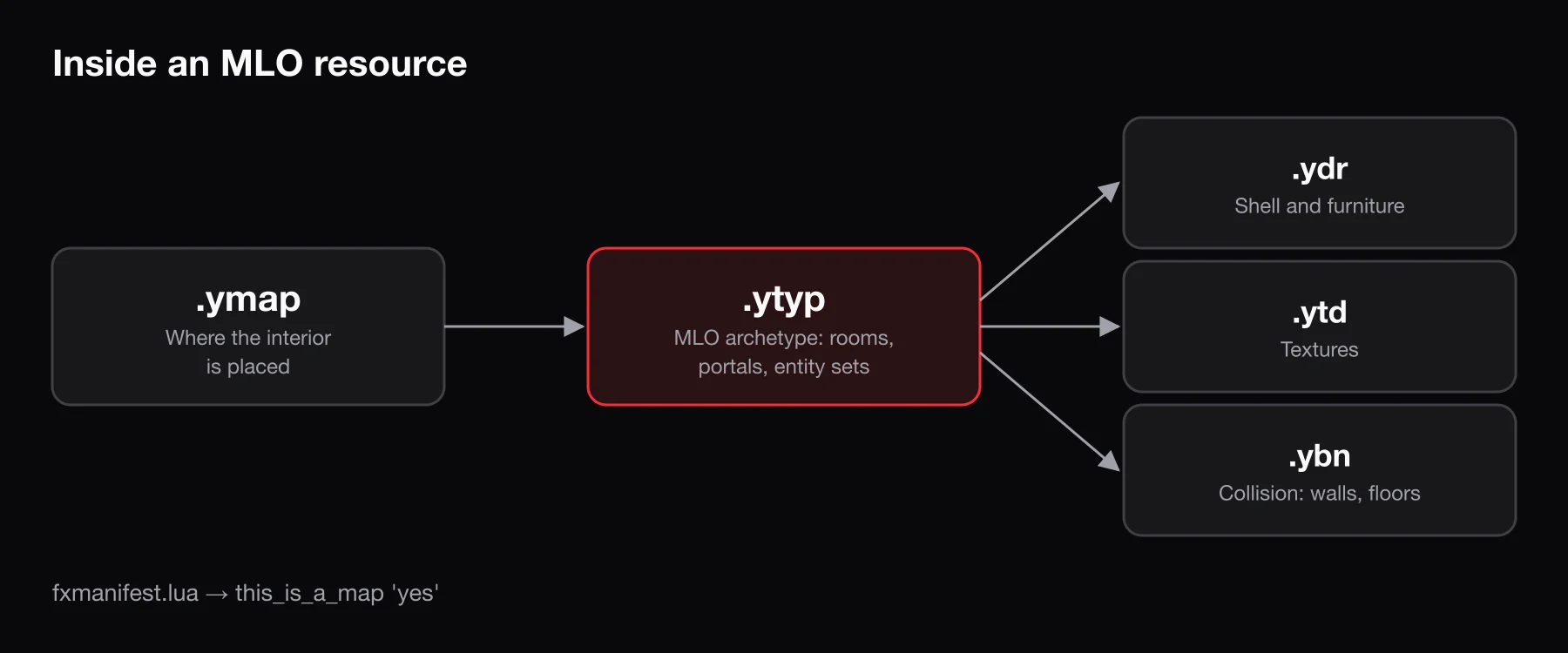
stream/folder of map files (.ytyp, .ymap, .ydr, .ybn, .ytd) and anfxmanifest.luathat declaresthis_is_a_map 'yes'and loads the .ytyp withdata_file 'DLC_ITYP_REQUEST'. Drop it inresources/,ensureit, and check that no other map edits the same area.
What an MLO is
MLO stands for Milo, the name Rockstar's tools use for interiors. The game treats an MLO as a real interior: it is split into rooms, and rooms are connected by portals (doorways, windows, openings). The engine uses rooms and portals to decide what to draw. When you stand in a back office, it does not render the warehouse floor on the other side of a solid wall. Rooms also carry their own lighting, timecycle and audio settings, which is why a good MLO feels different from the street outside.
That is the key difference from the other ways people "add a building" to a map:
| Type | What it is | Enterable? | Typical use |
|---|---|---|---|
| MLO | Interior archetype with rooms and portals, placed by a .ymap | Yes, with proper interior lighting and culling | Police stations, clubs, shops, houses |
| Ymap (props) | A placement file that drops existing or custom objects into the world | Only if the shell happens to be hollow | Extra props, decorations, road furniture, small exterior edits |
| Custom prop | A single .ydr model with its own textures and collision | No | Furniture, signs, decor inside an MLO |
| IPL | A named vanilla map section the game can load and unload at runtime | Depends on the IPL | Vanilla interiors and story-mode locations |
A "shell" built from props can look like an interior, but without rooms and portals the game has no idea it is inside, so lighting, weather and culling behave like you are standing outdoors.
What is inside an MLO resource
Every MLO you download or buy follows roughly the same layout:
resources/
└── [maps]/
    └── my_police_mlo/
        ├── fxmanifest.lua
        └── stream/
            ├── my_police_mlo.ytyp
            ├── my_police_mlo.ymap
            ├── pd_shell.ydr
            ├── pd_shell_col.ybn
            ├── pd_textures.ytd
            └── ...
Each file type has a specific job:
| Extension | Role |
|---|---|
.ytyp | Archetype definitions. For an MLO this defines the interior itself: its rooms, portals and the entities inside it. |
.ymap | Placement. Puts the interior (and any exterior props) at a position in the world. |
.ydr | Drawable models: walls, floors, furniture meshes. |
.ybn | Collision (bounds). What players, peds and vehicles actually stand on and bump into. |
.ytd | Texture dictionary. The images the models use. |
If any of these file types are new to you, GTA V file formats for FiveM explains each one in more depth.
How to install an MLO
- Unzip the download and find the folder that contains
fxmanifest.lua. Some packs wrap it in an extra folder or include a readme next to it; the resource is the folder with the manifest. - Copy it into
resources/. A[maps]category folder keeps things tidy. Do not rename files insidestream/. - Check the manifest. A typical MLO manifest looks like this:
fx_version 'cerulean'
game 'gta5'

this_is_a_map 'yes'

data_file 'DLC_ITYP_REQUEST' 'stream/my_police_mlo.ytyp'
this_is_a_map 'yes' marks the resource as a map so the game reloads its map storage when the resource loads. data_file 'DLC_ITYP_REQUEST' registers the .ytyp so the game knows the interior archetype exists. Without it the .ymap points at an archetype the game never loaded, and the building simply does not appear.
- Add it to
server.cfg:
ensure my_police_mlo-
Restart the server. You can
refreshandensurea map resource from the console, but map changes are far more reliable after a full restart and a fresh client connection. Clear your FiveM cache if the old version of an area keeps showing up. -
Install any companion scripts. Many MLOs ship with optional scripts for doors, elevators or job zones. These are normal Lua resources and often need configuring for your framework. If you are not sure which one you run, see Qbox vs QBCore vs ESX.
Paid and escrowed MLOs
Most paid MLOs are sold through Tebex and protected by Cfx.re Asset Escrow. Escrow encrypts selected files so they can only run on servers entitled to the asset. Per the Cfx.re docs, protected files include model formats such as .ydr, while creators can leave other files open with an escrow_ignore list in the manifest.
What this means for you:
- The asset is tied to an account. After purchase it is granted to your Cfx.re account. The server must run with a license key from the account that owns the asset, otherwise the console reports that you lack the required entitlement and the resource will not start.
- Download it from the Cfx.re Portal, not from a re-uploaded copy. Keep every file in the folder, including the hidden
.fxapfile. Some FTP clients skip hidden files, and the resource will fail to start without it. - You may not be able to edit everything. Encrypted models cannot be opened in CodeWalker or other tools. Whatever the creator left in
escrow_ignore(often placement or config files) can still be changed. If you need edits beyond that, ask the creator. - Subscription assets stop working when the subscription ends.
Conflicts and overlapping MLOs
Most "my MLO is broken" reports are actually two maps fighting over the same space. There are three common causes:
Two interiors in the same spot. If two MLOs are placed in overlapping positions, you get flickering walls, doubled floors and interiors that randomly fail to load. Only one interior should occupy a location. Pick one, or move one in CodeWalker.
Two resources streaming the same file. FiveM loads one copy of any given file name. If two map resources both ship a modified version of the same vanilla .ymap or .ybn, one silently overrides the other. The usual symptom is that one map loses its edits: a removed building reappears, or a collision change is undone and players hit invisible walls. The fix is to merge both edits into one copy of that file and remove the duplicate.
IPL scripts loading on top of your MLO. Resources like bob74_ipl load vanilla interiors and online-only map sections. That is usually what you want, but if your MLO replaces a vanilla interior that one of these scripts also loads, both end up in the world. Disable that interior in the IPL resource's config, or check whether your MLO creator provides a compatibility note.
A simple habit prevents most of this: keep a list of every map resource and the area it covers. Before installing a new MLO, check whether anything else already touches that block.
Replacing vanilla interiors and buildings
Many MLOs replace something that already exists, like a vanilla police station or an empty shop. There are two pieces to that:
- Vanilla interiors controlled by IPLs can be turned off at runtime with the
RemoveIplnative, or through your IPL resource's config. - Vanilla buildings and props that are part of the base map are removed by streaming a modified copy of the vanilla .ymap with those entities deleted. Good MLO packs ship that edited .ymap for you. This is exactly the kind of file that causes the "two resources stream the same file" conflict above, so watch for it.
Some MLOs also need a minimum game build because they use props from newer GTA Online updates. If parts of an interior are missing even though the files are correct, check the creator's notes for a required build and set it in server.cfg with sv_enforceGameBuild.
Performance: textures, LODs and memory
MLOs are some of the heaviest assets on a server. A detailed interior can include dozens of textures, and every player who walks near it has to load them.
- Watch the oversized asset warnings. When the server starts, FXServer warns about streamed files that use a lot of physical memory. Treat those warnings as a to-do list. Oversized texture dictionaries are a leading cause of texture loss across the whole server, not just inside that MLO.
- Right-size textures. A 4K texture on a door handle is wasted memory. Downscaling textures to match how large they appear on screen is the single most effective fix.
- Check LODs. Well-made models include lower-detail versions for distance. Without them, the game draws the full-detail model or nothing, which costs performance at a distance and makes buildings pop in as you approach.
- Fewer MLOs in the same block. Several dense interiors clustered on one street load together, so players in that area feel it most.
Optimizing FiveM assets covers texture compression and LOD checks step by step.
Editing MLOs with CodeWalker
CodeWalker is the standard free tool for viewing and editing GTA V map files. With it you can:
- Open the world and fly to an MLO to see exactly where it sits and what overlaps it.
- Create a project, add a resource's .ymap and .ytyp, and move, rotate or delete entities.
- Add or remove props inside an interior's rooms.
- Delete vanilla entities from a copy of a vanilla .ymap for a replacement build.
A few rules make editing safer:
- Work on a copy of the resource, never the live one.
- After moving an interior, also check that its collision moved with it. If the visual model and the .ybn no longer line up, players will float, clip or fall.
- Keep file names unchanged unless you also update every reference to them.
If you want to fill a finished interior with furniture that does not exist in the base game, custom FiveM props walks through streaming your own .ydr models. BLDR's 3D generator can produce those props from a text prompt or a reference image and exports a ready FiveM resource with .ydr, .ytd and .ytyp files and the DLC_ITYP_REQUEST line already in the manifest. It does not build MLOs themselves, only the props you place inside them.
Common MLO problems and fixes
| Problem | Likely cause | Fix |
|---|---|---|
| Building does not appear at all | .ytyp not registered, resource not started, or a missing this_is_a_map | Check the manifest's data_file path and that the resource is in server.cfg. Look for errors in the F8 console. |
| Falling through the floor | Missing or misaligned .ybn collision | Make sure every .ybn shipped with the MLO is in stream/, and that no other resource streams a .ybn with the same name. |
| Invisible walls | Collision from a removed vanilla building, or a conflicting .ybn from another map | Find which resource ships the collision in that spot and merge or remove it. |
| Missing or blurry textures | Missing .ytd, oversized textures, or too many heavy assets server-wide | Confirm the .ytd files are present, then reduce texture sizes across the server. |
| Flickering walls or floors | Two MLOs or a vanilla interior overlapping the same space | Remove the duplicate interior or disable the conflicting IPL. |
| Props missing inside the interior | Requires a newer game build or a separate prop pack | Check the creator's requirements and set sv_enforceGameBuild if needed. |
| Resource will not start | Escrowed asset on the wrong account, or missing .fxap | Use a license key from the account that owns the asset and re-upload the full folder. |
Frequently asked questions
What does MLO stand for in FiveM?
It comes from Milo, Rockstar's internal name for interiors. In FiveM it means any custom interior defined with rooms and portals, as opposed to props simply placed in the world.
Do I need this_is_a_map 'yes' for an MLO?
Yes. It tells FiveM the resource contains map data so the game reloads its map storage when the resource starts. Most MLO packs include it already; if one does not and the interior fails to load, adding it is the first thing to try.
Can I edit a paid MLO?
Only the parts the creator left unencrypted. Escrow-protected models cannot be opened or changed. Files listed in the manifest's escrow_ignore can be edited. For anything else, contact the creator.
Why do players fall through the floor in my MLO?
The interior's collision is missing, misplaced or overridden. Make sure all .ybn files are in the stream/ folder and that no other map resource ships a file with the same name in that area.