FiveM Optimization: Fix Texture Loss and Oversized Assets
Fix FiveM texture loss, slow joins and crashes. What the oversized assets warning means, plus how to shrink textures, cars, clothing packs and MLOs.
· 10 min read
Most FiveM servers that suffer from texture loss, "city bug", slow joins and client crashes do not have a scripting problem. They have an asset problem: a handful of cars, clothing packs or maps far heavier than anything Rockstar ships, all competing for the same streaming memory on every player's PC. This guide shows where that weight comes from, how to find it and how to cut it without making things look worse.
Short version: read the server console for "Asset ... uses X MiB of physical memory" warnings, sort your
stream/folders by size, and fix the worst offenders first. Most of the savings come from textures: drop oversized resolutions, use DXT1/DXT5 compression, keep mipmaps and stop shipping the same textures twice.
Why streamed asset size matters
Everything in a resource's stream/ folder costs you twice.
- Download on join. Players download every streamed file before they can play. FiveM caches files locally, so returning players only download what changed, but new players and anyone after a big update pay the full price. A server with several gigabytes of streamed content loses people on the loading screen.
- Client streaming memory. GTA V streams models and textures in and out of memory as players move, on a budget designed for Rockstar's own assets. When one car's textures take the memory of a dozen normal ones, the game evicts something else to fit them, usually the road and buildings around the player. That is texture loss.
File size on disk is only a hint. Streamed files are compressed, so a modest-looking .ytd can expand to a much larger footprint in memory. FiveM tells you the in-memory size, and that is the number that matters.
The "oversized assets" warning
When a resource starts, FXServer reads the memory size stored in each streamed file's header and prints a warning for anything large. The message looks like this:
Asset my_car/my_car.ytd uses 87.4 MiB of physical memory. Oversized assets can and WILL lead to streaming issues (such as models not loading/rendering).The thresholds come straight from FXServer's source code (ResourceStreamComponent.cpp):
| In-memory size | What the console shows |
|---|---|
| 16 MiB or less | Nothing |
| Over 16 MiB | Warning in blue |
| Over 32 MiB | Warning in yellow |
| Over 48 MiB | The "Oversized assets can and WILL lead to streaming issues" sentence is added |
| Over 64 MiB | Warning in red |
The check runs separately for physical memory (mostly texture data, the part that ends up on the GPU) and virtual memory (the CPU-side data such as model structure and geometry information). A big .ytd almost always trips the physical warning; a dense .yft or .ydr can trip the virtual one.
The resource still loads, but Cfx.re staff's guidance is to aim for roughly what an equivalent Rockstar asset uses. Treat every red line as a bug and every yellow line as a to-do.
Textures: where most of the weight lives
Textures live inside .ytd texture dictionaries (or embedded in models, more on that below). The memory a texture uses depends on three things: resolution, format and whether it has mipmaps.
Resolution
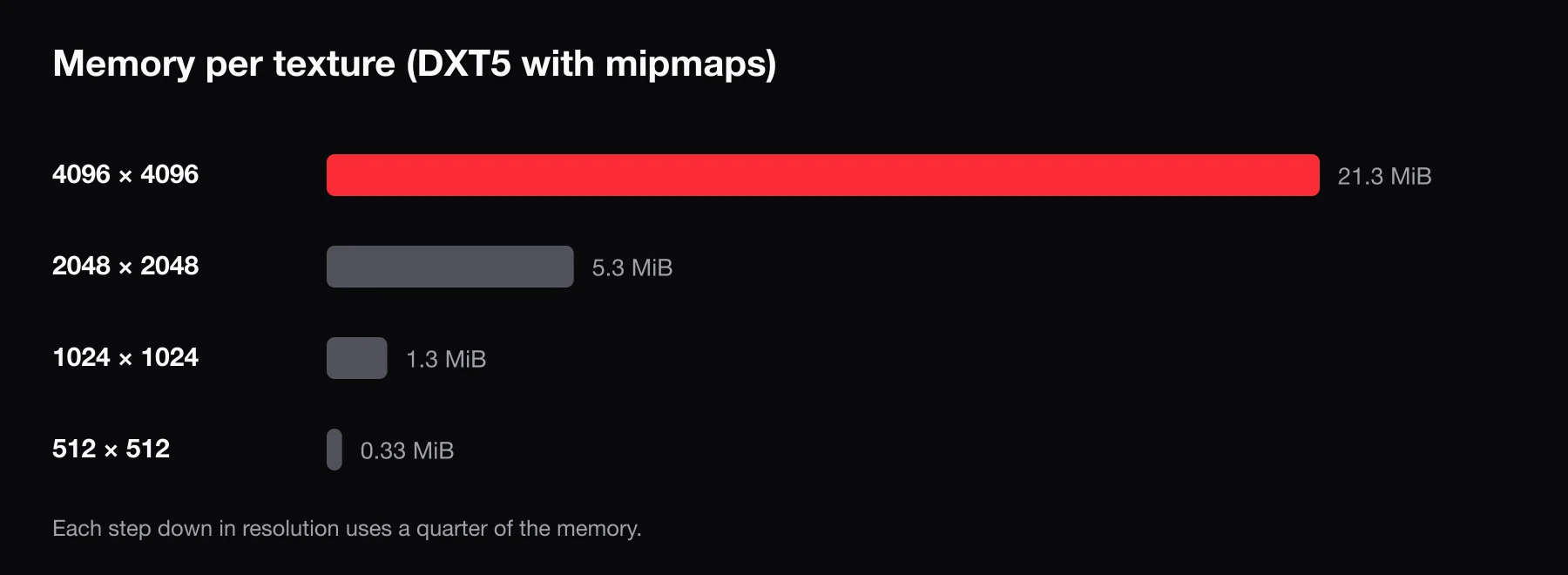
Memory scales with the number of pixels, so halving the width and height cuts the cost by four. Here is what a single texture costs at common sizes:
| Resolution | Uncompressed (A8R8G8B8) | DXT5 | DXT1 |
|---|---|---|---|
| 4096 × 4096 | 64 MiB | 16 MiB | 8 MiB |
| 2048 × 2048 | 16 MiB | 4 MiB | 2 MiB |
| 1024 × 1024 | 4 MiB | 1 MiB | 0.5 MiB |
| 512 × 512 | 1 MiB | 0.25 MiB | 0.125 MiB |
Add roughly a third on top of each figure for a full mipmap chain. One uncompressed 4K texture is enough to trip the red warning on its own, and car packs often ship several.
Compression formats
GTA V uses block-compressed DDS formats, also called BC formats:
- DXT1 (BC1) — no alpha or 1-bit alpha. The cheapest option. Use it for most diffuse textures without transparency.
- DXT5 (BC3) — full alpha channel at twice the cost of DXT1. Use it when the texture needs smooth transparency, such as glass, decals or hair.
- Uncompressed (A8R8G8B8) — four times the cost of DXT5. Only justified for very small textures where compression artifacts are obvious, like some UI elements.
Exporting everything as uncompressed or DXT5 "to be safe" is a common mistake. Converting non-transparent textures to DXT1 is often the biggest single win on a car pack.
Mipmaps
Mipmaps are pre-shrunk copies of a texture that the game uses for distant objects. They cost about a third extra memory, but removing them is a false economy: distant objects then shimmer and still sample the full-size texture. Keep mipmaps and save memory by lowering resolution instead.
Power-of-two sizes
Use power-of-two dimensions: 256, 512, 1024, 2048. Non-square is fine (1024 × 512). Block compression works on 4 × 4 pixel blocks and each mip level halves the size, so odd sizes like 1000 × 750 compress poorly and produce messy lower mips.
Which textures you can safely shrink
Not every texture needs the same detail. A practical order of attack:
- Safe to drop hard: interior and underbody textures, engine bays, brake calipers, small badges, anything the camera rarely sees up close.
- Usually safe to halve: normal maps and specular maps. Players notice blurry color long before they notice a softer normal map.
- Keep higher: the main body or livery texture of a vehicle, faces and the most visible clothing textures.
Watch liveries: each is its own texture, so ten 4K liveries cost ten times as much even though only one shows at a time.
Models: polygons, LODs and embedded textures
Models stream as .ydr (drawables), .ydd (drawable dictionaries, used for clothing) and .yft (fragments, used for vehicles and breakable objects). If the file names are unfamiliar, see GTA V and FiveM file formats.
- Polygon count. Models made for renders or other games often carry far more geometry than GTA V needs, inflating virtual memory and frame time.
- LODs. GTA V swaps in simpler versions of a model with distance. A model with only a high-detail level renders the full mesh everywhere.
- Embedded vs shared textures. A model can embed its textures or reference a separate
.ytd. If ten props each embed the same wood texture, you pay ten times. Put shared textures in one.ytd.
When building your own props, these choices are made at export time. Custom FiveM props covers how a prop resource is put together.
Vehicles: the classic offender
Vehicles are the most common source of red warnings, for a few reasons:
- Ported models. Cars converted from other games often bring dozens of 4K textures and extremely dense meshes.
- The
_hifiles. A GTA V vehicle is split intoname.yftandname_hi.yft, plusname.ytdand oftenname+hi.ytd. The_hiand+hifiles hold the high-detail model and textures used up close; the regular files are meant to be lighter. Many conversions put full-detail content in both, so the car is effectively loaded twice.
For each flagged car, sort the .ytd textures by size and fix the largest first. DXT1 for non-alpha textures and 512 or 1024 for interior and detail textures usually gets a car out of the red.
Clothing packs
Clothing packs are many small .ydd and .ytd files. Individual files rarely trigger warnings; the problem is volume. Every drawable and texture variation adds to the download, and large packs push total streamed size into gigabytes.
- Remove drawables nobody wears. Old event outfits and duplicate variations add up.
- Keep clothing textures sensibly sized. A shirt does not need a 4K texture.
- Watch the number of drawables per component slot. GTA V has a limit per slot, and packs that exceed it cause clothing to show up wrong or not at all.
FiveM clothing packs goes into how packs are structured and installed.
Maps and MLOs
Maps and MLO interiors combine all of the above, plus placement files (.ymap, .ytyp). Check:
- Texture dictionaries. Mappers often ship one huge
.ytdfor an entire interior. Splitting or downsizing it helps, since the whole dictionary loads when any object needs it. - Collision. Build collision (
.ybn) from a few simple shapes, not from the detailed model players see. Reusing the render mesh as collision costs performance and tends to make physics misbehave. - Overlapping maps. Two maps editing the same area cause flickering or missing objects. Keep one.
For more on how interiors are built and loaded, see FiveM MLOs.
Auditing your server
You do not need to optimize everything. Find the worst 10% and fix that.
1. Read the console
Every startup warning names the resource and file. Collect them and sort by size.
2. Sort stream folders by size
On Linux or macOS, this lists the 30 largest streamed files across all resources:
find resources -path '*/stream/*' -type f -exec du -k {} + | sort -rn | head -30On Windows, PowerShell does the same:
Get-ChildItem resources -Recurse -File |
  Where-Object { $_.FullName -match '\\stream\\' } |
  Sort-Object Length -Descending |
  Select-Object -First 30 FullName, @{n='MB';e={[math]::Round($_.Length/1MB,1)}}
Remember that disk size is compressed; use it to find candidates and the console warnings to confirm.
3. Find duplicates
Large servers collect duplicates: two resources streaming the same car, an old MLO next to its update. With duplicate file names one version overrides the other, yet players still download both. Search resources/ for repeated file names and keep one copy.
4. Remove what you do not use
Resources you do not ensure are not sent to players, but they clutter audits. Delete unused packs, including the cars nobody drives.
Tools
| Tool | What it is for |
|---|---|
| OpenIV | Opening .ytd, .ydr and .yft files, viewing texture sizes and formats, and exporting or replacing textures. |
| CodeWalker | Exploring maps and placement data, previewing models and textures, and editing .ymap/.ytyp files. |
| Sollumz | Free Blender add-on for importing and exporting GTA V models, including LODs and collision. |
| DDS-capable image editors | Paint.NET (built-in DDS support), GIMP, or Photoshop with NVIDIA's Texture Tools Exporter, for resizing and recompressing textures. |
Typical fix: export the largest textures from the .ytd in OpenIV, resize and recompress them with mipmaps, then import them back.
Scripts matter too, briefly
Scripts can still cause stutter. Press F8 and run resmon 1 to see client CPU time per resource; an idle script should sit near 0.00 ms. The usual culprit is a while true do Wait(0) loop running every frame when it only matters near a location. Use longer waits, distance checks and events. The server setup guide has a short performance checklist for the rest of the stack.
If you are building new props instead of fixing old ones, BLDR's 3D generator creates game-ready props from a prompt, image or GLB and exports them as a FiveM resource with .ydr, .ytd and .ytyp files, so you can check their texture sizes before they ever reach your stream/ folder.
Frequently asked questions
What size should a FiveM asset be?
FXServer starts warning when a streamed file uses more than 16 MiB of physical or virtual memory, so 16 MiB is the practical target. Many vehicles and props can be far smaller than that. Anything above 48 MiB gets the explicit "oversized assets" warning and should be fixed first.
Does the oversized assets warning mean the resource is broken?
No. The resource still loads and may look fine on a quiet test server. The warning means the asset takes a disproportionate share of streaming memory, which shows up as texture loss and missing models when many players and assets are in the same area.
Will reducing texture size make my cars look worse?
Not noticeably if you do it in the right order. Interior, underbody and detail textures can drop a lot with no visible difference in normal play. Keep the main body and livery textures at a reasonable resolution, use DXT1 where there is no transparency and leave mipmaps on.
Why do players still have texture loss after I fixed the warnings?
Texture loss depends on everything loaded around the player. Many medium-sized assets in one spot, like a car meet next to a detailed MLO, can still exhaust streaming memory. Keep reducing total streamed size where players gather.