How to Make a FiveM Server: The Complete 2026 Guide
Set up a FiveM server from scratch: license key, server artifacts, txAdmin, frameworks, database, ports, server.cfg and custom content, step by step.
· 9 min read
A FiveM server is a modified GTA V multiplayer server that runs your own rules, scripts, cars, clothing and maps. Setting one up takes about 30 minutes if you follow the steps in order. This guide walks through the whole path: from an empty folder to a server your friends can join, and then to one that feels like your server.
Short version: get a free license key from the Cfx.re Portal, download the recommended server build, run it, finish the txAdmin setup in your browser, pick a framework recipe, open port 30120 and connect.
What you need before you start
| Requirement | Details |
|---|---|
| A Cfx.re account | Free. You use it to sign in to txAdmin and to create your license key. |
| A license key | Free, from the Cfx.re Portal. One key per server. |
| A machine to host on | Your own Windows/Linux PC for testing, or a VPS/dedicated server for a public server. |
| A database (for most frameworks) | MariaDB. ESX, QBCore and Qbox all store players, vehicles and inventories in SQL. |
| GTA V on your client PC | Only the people playing need a legitimate copy. The server itself does not need GTA V installed. |
How much hardware? A small private server for friends runs comfortably on a modern 4-core CPU with 8 GB of RAM. A public roleplay server with 64+ players and hundreds of resources needs a fast single core (FiveM's main server thread benefits from high clock speeds more than core count), 16–32 GB of RAM and an NVMe SSD. You can always start small and move later; the server folder is portable.
Self-hosting vs a hosting provider
You have two options:
- Self-host on your own PC. Free and perfect for development and testing, but your PC must stay on, your home upload speed limits how many players can join, and you need to forward ports on your router.
- Rent a VPS or game server host. Costs money every month but gives you a stable connection, a static IP and better uptime. Most "FiveM hosting" companies offer one-click txAdmin installs.
A common path is to build and test locally, then move the finished server folder to a host when you are ready to open the doors. Everything below works the same way in both cases.
Step 1: Get your license key
- Go to the Cfx.re Portal and sign in with your Cfx.re account.
- Open the server section and register a new server key.
- Enter the IP address of the machine that will host the server. For local testing, your public IP is fine.
- Copy the key. You will paste it into txAdmin in Step 4.
Keep this key private. Anyone with it can start a server that appears to be yours.
Step 2: Download the server build
FiveM's server software is called FXServer, and its builds are called artifacts.
- Open the official server download page and follow the link to the artifacts for your operating system.
- Download the recommended build, not simply the newest one. The recommended build has been tested; the latest one occasionally breaks resources.
- Extract the archive into an empty folder, for example
C:\FXServer\serveron Windows. Use 7-Zip or WinRAR for.7zfiles. On Linux, extractfx.tar.xzinto something like~/fxserver.
Keep the server binaries (server/) separate from your server data (resources and server.cfg, created in Step 4). Updating FXServer later is then just a matter of replacing the binaries folder.
GTA V Legacy vs Enhanced: Cfx.re now publishes separate server builds for the newer GTA V Enhanced edition. Most existing resources, frameworks and asset packs were built for the Legacy edition, so check that everything you plan to use supports the build you pick before you commit.
Step 3: Start the server and open txAdmin
Every modern FiveM server is managed through txAdmin, a web panel that ships with FXServer.
- Run
FXServer.exeon Windows, or./run.shon Linux. - The console prints a URL (by default on port 40120) and a 4-digit PIN. On Windows the browser usually opens on its own.
- Click Link Account, sign in with your Cfx.re account and authorize txAdmin.
- Create a password for the txAdmin panel. This is the master password for your server, so treat it like one.
Step 4: Choose a recipe and deploy
txAdmin builds your server from a recipe: a script that downloads a framework, its core resources and a ready-made server.cfg.
- Enter your server name.
- Choose Popular Recipes. The main options are:
- CFX Default – an empty sandbox with no roleplay systems. Good for freeroam, racing or learning.
- Qbox Framework, QBCore Framework and ESX Legacy – full roleplay frameworks with jobs, money, inventories, vehicles and housing.
- Confirm where txAdmin should save the server data.
- In the Recipe Deployer, paste the license key from Step 1.
- If the recipe needs a database, enter your MariaDB host, user and password (see the next step).
- Run the recipe, then click Save & Run Server.
Not sure which framework to choose? Read Qbox vs QBCore vs ESX first. Switching frameworks later means rewriting or replacing most of your scripts, so this is the one decision worth slowing down for.
Step 5: Set up the database
Roleplay frameworks need a SQL database. Install MariaDB (Qbox requires MariaDB 10.9 or newer and does not support MySQL; ESX and QBCore work with either, but MariaDB is the safe default).
- Install MariaDB and set a root password during setup.
- Optionally install HeidiSQL (bundled with the Windows MariaDB installer) to browse your data.
- Give txAdmin the connection details when the recipe asks. It creates the database and imports the framework's tables for you.
Resources talk to the database through oxmysql. The connection string lives in server.cfg:
set mysql_connection_string "mysql://root:yourpassword@localhost/your_database?charset=utf8mb4"If the server console shows oxmysql connection errors, this line is almost always the cause: wrong password, wrong database name or MariaDB not running.
Step 6: Open your ports
Players connect on port 30120, over both TCP and UDP.
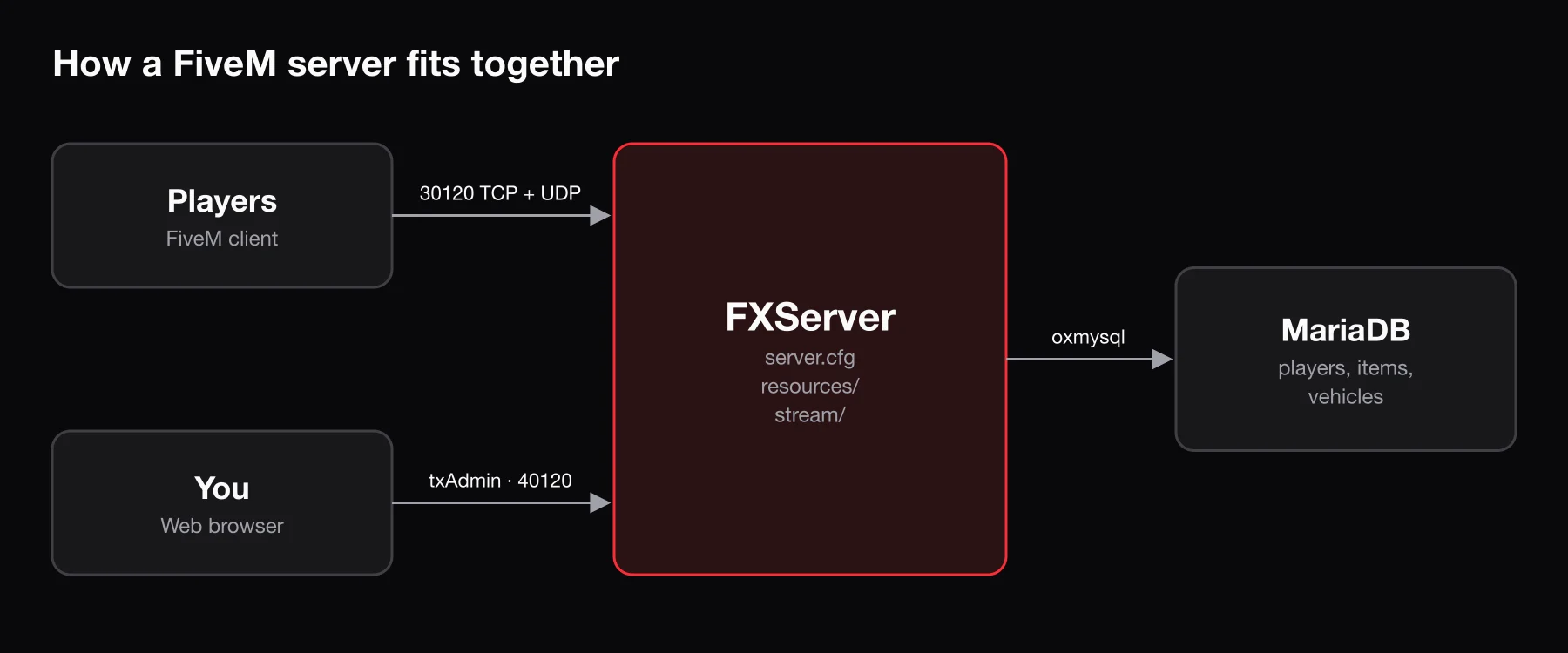
- Windows Firewall: add inbound rules allowing TCP and UDP on port 30120.
- Linux: allow the port in your firewall, for example
ufw allow 30120. - Home network: forward TCP and UDP 30120 on your router to your PC's local IP.
Do not expose the txAdmin port (40120) publicly unless you need to manage the server remotely, and if you do, use a strong password.
Step 7: Connect to your server
- Launch FiveM.
- Press F8 to open the console.
- Type
connect localhost:30120if the server is on the same PC, orconnect your.ip.address:30120from another machine.
Your server also appears in the in-game server browser once it is running with a valid license key.
The server.cfg settings that matter
server.cfg is your server's main configuration file. txAdmin generates one, but these are the lines you will touch most:
sv_hostname "My Server | Serious RP | Custom Cars"
sets sv_projectName "My Server"
sets sv_projectDesc "A short description shown in the server list"
sets tags "roleplay, custom cars, economy"
sets locale "en-US"

sv_maxclients 48
sv_licenseKey "your_license_key"

ensure oxmysql
ensure ox_lib
ensure my_first_resourcesv_maxclientssets the player limit. Without a Cfx.re Element Club subscription, servers are limited to 48 slots.ensurestarts a resource. Order matters: start dependencies such asoxmysqlandox_libbefore the resources that use them.sets tagsandsv_projectDescare what players see in the server browser, so write them for humans, not for keywords.
How resources work
Everything on a FiveM server – scripts, cars, clothing, maps, emotes – is a resource: a folder inside resources/ with an fxmanifest.lua file that tells FXServer what to load.
resources/
├── [core]/            ← folders in [brackets] are just for organization
├── [cars]/
│   └── my_police_pack/
│       ├── fxmanifest.lua
│       ├── stream/    ← .yft / .ytd / .ydr files go here
│       └── data/      ← vehicles.meta, carvariations.meta, ...
└── my_first_resource/
    ├── fxmanifest.lua
    ├── client.lua
    └── server.lua
A minimal fxmanifest.lua:
fx_version 'cerulean'
game 'gta5'
lua54 'yes'

client_script 'client.lua'
server_script 'server.lua'
Add ensure my_first_resource to server.cfg, then type refresh and ensure my_first_resource in the server console (or use txAdmin's resource page) to load it without a full restart.
Files inside a stream/ folder are streamed to players automatically. That is how you add custom models, textures and animations without touching game files.
Making the server yours: custom content
A fresh framework install looks like every other server. Custom content is what makes players stay:
- Scripts – jobs, shops, heists, minigames and UIs. Most need to be written for your framework, so mention it whenever you buy, download or generate a script. BLDR's script builder writes framework-aware Lua for Qbox, QBCore and ESX.
- Vehicles – streamed
.yft/.ytdfiles plus meta files. Keep an eye on texture sizes; oversized vehicle textures are the most common cause of texture loss and long load times. Optimizing FiveM assets explains how to fix them. - Clothing – EUP packs or custom clothing streamed through a clothing resource. See FiveM Clothing Packs.
- Props and maps –
.ydrmodels for props and MLOs for interiors. You can generate game-ready 3D props from a prompt or a reference image; the custom props and MLO guides cover installing both. - Emotes – custom animations stream as
.ycdfiles. See Custom FiveM Emotes to turn any video into an in-game emote.
Keep the server fast
Performance problems usually creep in one resource at a time. Build these habits early:
- Open resmon (press F8, type
resmon 1) and watch client CPU time per resource. An idle script should sit near 0.00 ms; anything that stays above about 0.10 ms while nothing is happening deserves a look. - Avoid
while true do Wait(0)loops that run every frame when they do not need to. Use longer waits, distance checks or events. - Check the server's own profiler in txAdmin for slow server-side scripts and heavy database queries.
- Compress and right-size textures before streaming them. A 4K texture on a small prop costs every player memory and download time.
Going live
Before you invite the public:
- Back up your database and
resources/folder, and schedule automatic backups. - Set up permissions with txAdmin admins and ACE permissions so only staff can use admin commands.
- Test with a few friends to find broken scripts and missing dependencies before strangers do.
- Create a Discord for announcements, rules, support and whitelisting.
- Open a store if you plan to monetize. Most servers use Tebex, which is the platform Cfx.re approves for server monetization. Read the Cfx.re monetization rules before you sell anything.
Frequently asked questions
Is it free to make a FiveM server?
Yes. The server software, txAdmin and the license key are free. You only pay for hosting if you rent a server, and for an Element Club subscription if you need more than 48 player slots.
Can I host a FiveM server and play on the same PC?
Yes, and that is the normal way to develop. Expect lower performance than on a dedicated machine, especially with many resources.
Does the server need GTA V installed?
No. The server does not need the game files. Every player who connects needs their own legitimate copy of GTA V.
Why can my friends not connect?
Nine times out of ten it is port 30120 (TCP and UDP) not being forwarded or allowed through the firewall. Check that the server shows up in the server browser and that your license key was registered with the correct IP.
Which framework should I use?
It depends on the scripts you want and how much you plan to customize. Qbox vs QBCore vs ESX compares them side by side.